Managing Documents
Karomia uses your organization's existing documents to auto-populate data points in your sustainability report. Uploading comprehensive and relevant documents is the foundation for high-quality AI-generated answers.
Upload categories
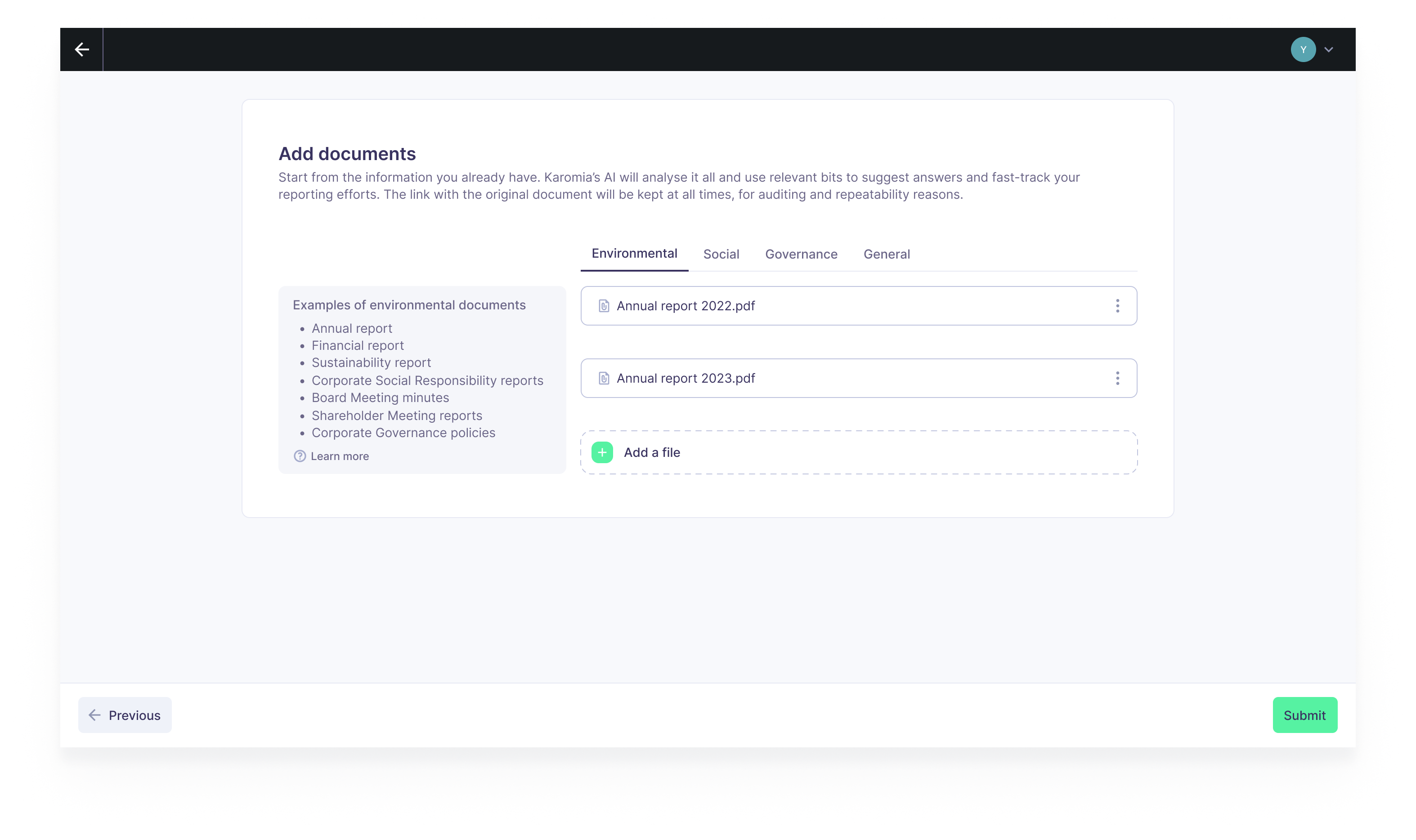
Documents are organized into four tabs, each aligned with a pillar of sustainability reporting:
Environmental
Upload documents related to ESRS topics E1 through E5:
- E1 — Climate Change: Climate risk assessments, transition plans, greenhouse gas emissions data, energy consumption reports, carbon footprint analyses.
- E2 — Pollution: Pollution control plans, air/water/soil quality monitoring reports, pollutant release data, hazardous substance management documentation.
- E3 — Water and Marine Resources: Water management policies, water consumption and withdrawal data, wastewater treatment reports, marine resource impact assessments.
- E4 — Biodiversity and Ecosystems: Biodiversity impact assessments, habitat conservation plans, land use change documentation, ecosystem restoration reports.
- E5 — Resource Use and Circular Economy: Waste management reports, recycling rate data, material flow analyses, circular economy strategies, product lifecycle assessments.
Social
Upload documents related to ESRS topics S1 through S4:
- S1 — Own Workforce: HR policies, employment contracts and terms, diversity and inclusion reports, health and safety records, training and development programs, employee survey results, works council agreements.
- S2 — Workers in the Value Chain: Supplier audit reports, supply chain due diligence documentation, contractor labor standards, value chain worker engagement records.
- S3 — Affected Communities: Community engagement reports, social impact assessments, stakeholder consultation records, local development contributions, grievance mechanism documentation.
- S4 — Consumers and End-users: Product safety certifications, customer complaint records, data privacy policies, consumer satisfaction surveys, product labeling and information documentation.
Governance
Upload documents related to ESRS topic G1:
- G1 — Business Conduct: Code of ethics, anti-bribery and anti-corruption policies, compliance training records, whistleblower policies, political engagement and lobbying disclosures, payment practices documentation.
General
Upload cross-cutting documents that inform multiple topics:
- Double Materiality Assessment results
- Annual report
- Corporate governance report
- Previous sustainability reports
- Risk management policies
- Stakeholder engagement documentation
- Company strategy and business model descriptions
Accepted file types
Karomia accepts the following document formats:
- .docx — Microsoft Word documents
- .pdf — PDF documents
- .pptx — Microsoft PowerPoint presentations
- .xlsx — Microsoft Excel spreadsheets
Numerical value templates
For data points that require numerical values (e.g., energy consumption, emissions figures, workforce statistics), Karomia provides downloadable Excel templates organized by ESRS topic. These templates are pre-structured with the exact fields needed for each data point, making it easy to collect and upload quantitative data in the correct format.
Uploading documents
To upload documents to your report:
- Navigate to the Documents section of your report.
- Select the appropriate category tab (Environmental, Social, Governance, or General).
- Click Upload or drag and drop your files.
- Add a description to help the AI understand the document's content and relevance.
- Click Submit to begin processing.
Once documents are submitted, they cannot be edited. Make sure your documents are final before uploading. If you need to replace a document, upload the corrected version as a new file.
After submission, Karomia's AI engine processes each document, extracting relevant information and mapping it to the applicable data points in your report. Processing time depends on the number and size of your documents.
Best practices
- Upload comprehensive documents — The more relevant content you provide, the better the AI-generated answers will be.
- Use the correct category — Placing documents in the right tab helps the AI prioritize relevant information for each ESRS topic.
- Include numerical data in Excel format — Use the provided templates for quantitative data to ensure accurate extraction.
- Review AI output after processing — Always verify that the AI has correctly interpreted your documents. See Report editor for the review workflow.
Next steps
- Report editor — Review and refine AI-generated answers.
- Exporting reports — Generate your final report.