Team Management
Karomia is designed for teams. The Members section helps you manage who has access to your organization's workspace and what they can do. For CSRD and VSME reporting, Karomia provides a structured collaboration workflow with dedicated roles so every team member knows their responsibilities.
Inviting team members
- Navigate to Members from the main navigation.
- Click Invite Member.
- Enter the email address of the person you want to invite.
- Select a role for the new member.
- Click Send Invitation.
The invited person will receive an email with instructions to join your organization.
Managing members
From the Members page, you can:
- View all members — See a list of everyone in your organization.
- Change roles — Update a member's role and permissions.
- Remove members — Revoke access for someone who no longer needs it.
- Resend invitations — Send another invitation email if the original was missed.
Member roles
Karomia provides role-based access control. See Roles and permissions for details on available roles and what each can do.
CSRD reporting roles
For CSRD reporting, Karomia uses three dedicated roles to structure the data collection and review process:
| Role | Responsibility |
|---|---|
| Contributor | Provides data and uploads supporting documents |
| Reviewer | Generates, reviews, and completes answers based on the provided data |
| Validator | Validates final answers to ensure accuracy and audit-readiness |
Custom labels
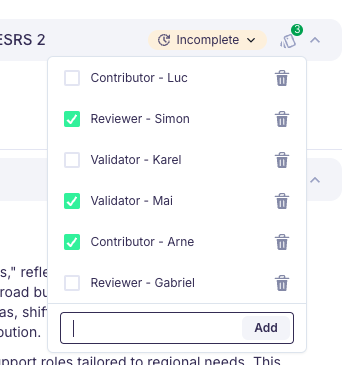
You can assign custom labels that combine a role with a person's name (e.g., "Contributor - Luc" or "Reviewer - Sarah"). Labels make it immediately clear who is responsible for each data point when viewing report progress.
@mentions and notifications
Use @mentions in comments to assign tasks or ask questions to specific team members. When you mention someone, they receive an email notification with a direct link to the relevant data point, so they can take action without searching for it.
Collaboration workflow
The CSRD reporting workflow follows a clear path through the three roles:
- Contributors upload documents and provide source data for their assigned topics.
- Contributors notify Reviewers (via @mentions) that data is ready for processing.
- Reviewers review the AI-generated output, address any gaps, edit where needed, and mark data points as complete.
- Validators perform a final review and validate each data point. Validation locks the data point to prevent further changes and signals audit-readiness.
Tracking progress
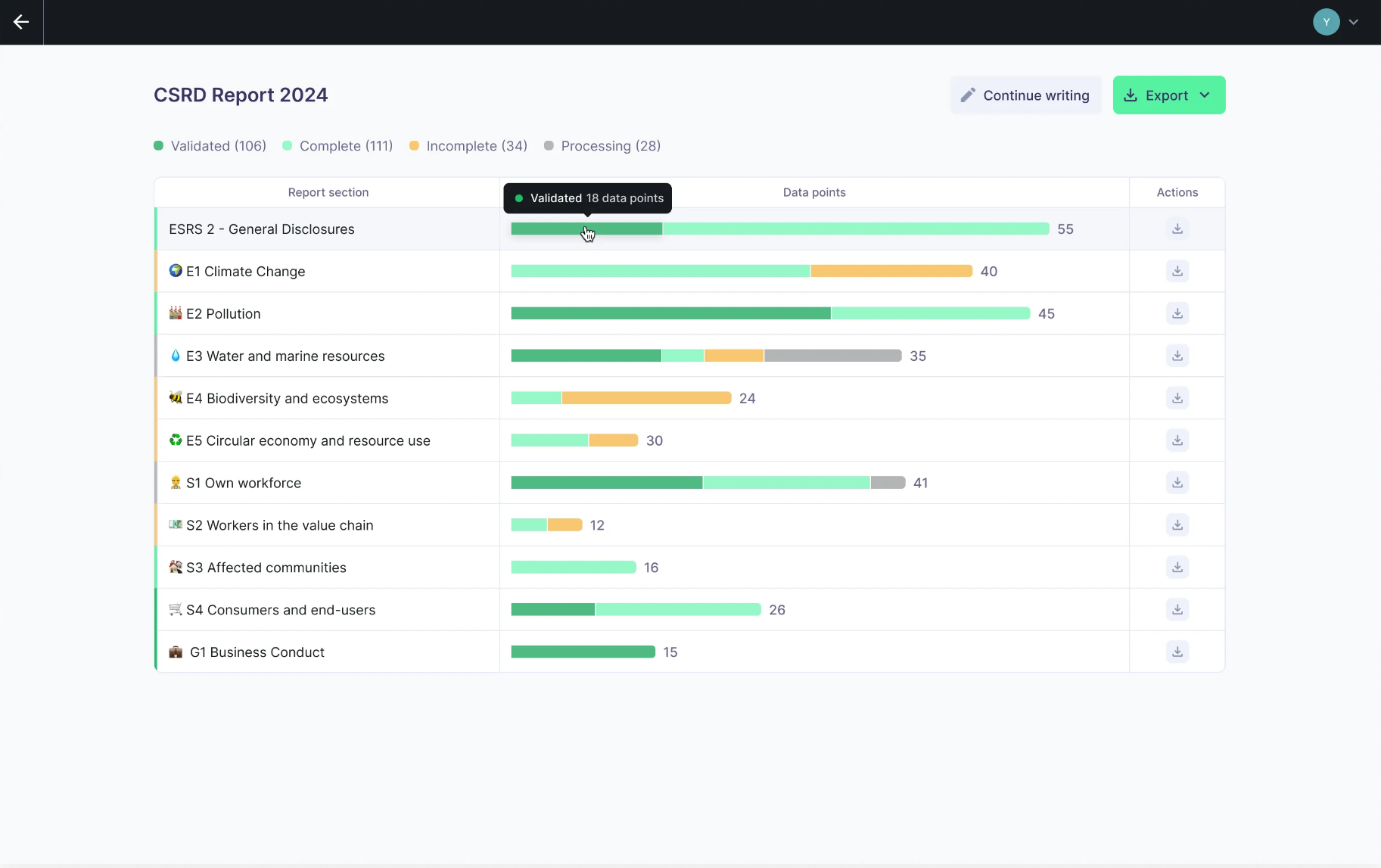
The Progress page shows all data points organized by topic, along with their current status (pending, in review, complete, validated). Use the filters to focus on specific topics, assigned roles, or statuses to quickly identify where attention is needed.
Data access requests
Team members can request access to specific data or sections they do not currently have permission to view:
- A member submits a data access request.
- Administrators receive a notification.
- The administrator reviews and approves or denies the request.
Managing your team effectively ensures that the right people have access to the right information while maintaining data security and compliance.
Next steps
- Roles and permissions — Understand the role system.
- Real-time editing — Collaborate on reports.