Assessment Reporting
Once your Double Materiality Assessment is complete, Karomia generates a comprehensive DMA report that documents the entire process, methodology, and findings. This report is designed to align with CSRD and ESRS requirements, making it suitable for audit and assurance purposes.
Report structure
The DMA report is organized into the following sections:
Summary
A high-level overview of the assessment, including the scope, key findings, and the final list of material topics.
Methodology
Detailed documentation of the assessment methodology, covering four areas:
- IRO identification — How impacts, risks, and opportunities were identified, including the AI generation process and your manual selection and refinement.
- Stakeholder group identification — How stakeholder groups were defined, their relevance to each topic, and the weighting applied.
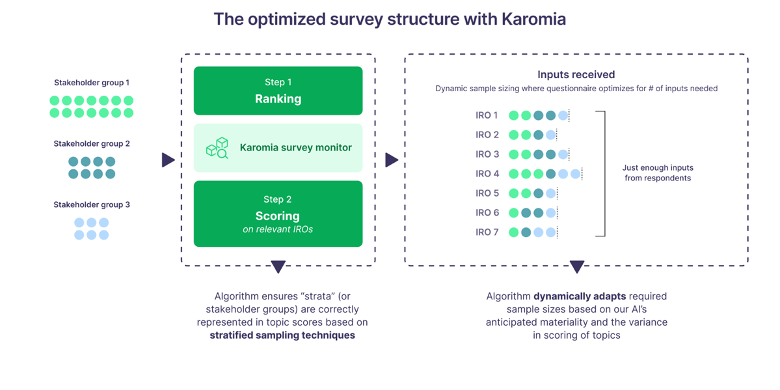
- Data collection — The methods used (surveys, interviews, focus groups), participation rates, and representative sample considerations.
- Materiality calculation — The formulas, weighting layers, aggregation approach, and threshold definitions used to determine materiality.
Results
A comprehensive presentation of the assessment outcomes:
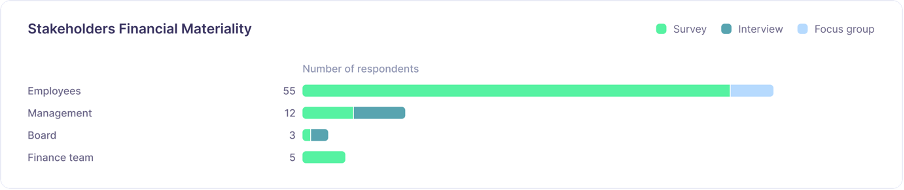
- Stakeholder data breakdown — Response counts, participation rates, and demographic information per stakeholder group.
- Materiality outcomes — The materiality matrix, scores per subtopic, and the classification of each subtopic as material, undecided, or not material.
Analysis
Qualitative analysis of the material topics, including:
- Key themes and patterns across material topics.
- Stakeholder perspectives and areas of consensus or divergence.
- Connections between topics and your organization's business activities.
Discussion
Coverage of the undecided subtopics, including:
- The rationale for each final determination (material or not material).
- Stakeholder input that informed the decision.
- Any additional context or considerations.
Appendix
- Qualitative summary — A consolidated summary of all qualitative input received from stakeholders.
- IRO rationale — Detailed rationale for every IRO assessed, including why it was selected and how it was scored.
Areas for your input
While Karomia generates the report automatically based on your assessment data, certain sections benefit from your direct input to provide additional context and strengthen the report:
| Area | What to provide |
|---|---|
| IRO selection reasoning | Explain why specific IROs were included or excluded from the shortlist. Document any organizational considerations that guided your selection. |
| Data collection decisions | Describe why certain data collection methods were chosen for specific stakeholder groups, and any practical constraints that shaped your approach. |
| Additional disclosures | Add any supplementary information not captured in the structured assessment that is relevant to your materiality determination. |
| Undecided topic decisions | For each undecided subtopic, provide the reasoning behind your final determination. This is particularly important for audit purposes. |
Completing these input areas strengthens the report's credibility and demonstrates thorough governance of the assessment process. Auditors will look for clear documentation of decision-making throughout the DMA.
Using the report
The DMA report serves multiple purposes:
- Auditor documentation — Provides the evidence trail auditors need to verify your assessment process and conclusions. The report structure aligns with CSRD and ESRS assurance requirements.
- Board and management presentations — Communicate DMA findings to leadership with a professionally structured document.
- Sustainability report input — Use the findings and methodology as the foundation for your CSRD disclosures.
- Stakeholder communication — Share results with participating stakeholders to close the feedback loop.
Generating the report
- Navigate to the Reporting section of your assessment.
- Review and complete any areas requiring your input.
- Click Generate to produce the report.
- Download or view the report.
If you need assistance interpreting results or completing the report input areas, contact our support team through the in-app chat.
Next steps
- Create a sustainability report — Build your full sustainability report based on DMA findings.